 Supermail
All your Gmail accounts in one app
· Mac and iPhone
Most people have more than one Gmail account. Supermail keeps them all in one app, each with its own inbox, and switching between them takes one key on the Mac or one tap on iPhone.
Add an account
On the Mac, open the account menu at the top right and choose Add Google account, or press ⌘K and type "add". On iPhone, hold the round account button at the bottom of the inbox and tap Add account.
Switch on the Mac
⌃1 opens your first account, ⌃2 your second, and so on up to ⌃9. The account menu at the top right lists every account with its unread count, and shows a dot when another account has new mail. Drag accounts into the order you want in Settings. Supermail opens on the first one.
Switch on iPhone
The round button at the bottom of the inbox shows which account you're in.
- Tap it to jump to your next account. After the last one, it goes back to the first.
- Hold it for every account with its unread count, plus Drafts, Sent, Reminders and Settings.
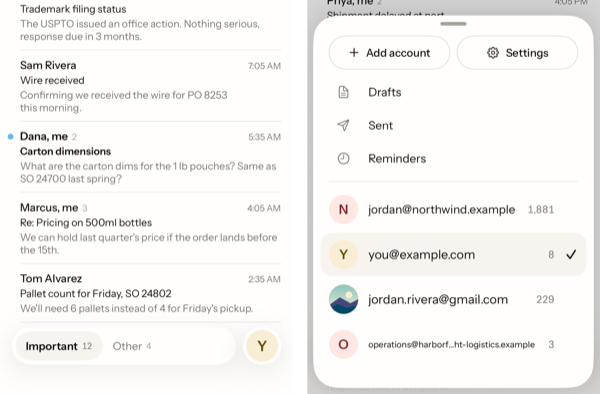
Each account shows its first letter on the button. Hold an account in that list to give it a picture instead.
Supermail loads your other accounts ahead of time on both the Mac and iPhone, so a switch doesn't wait on a spinner.
Your other addresses
If you send from more than one address in Gmail, like you@ and sales@, Supermail knows they're all you:
- Mail you sent from any of them says "me", like in Gmail.
- A reply goes out from the address the email was sent to, with that address's name and signature.
- On the Mac, ⌘⇧F picks a different From address while you write.
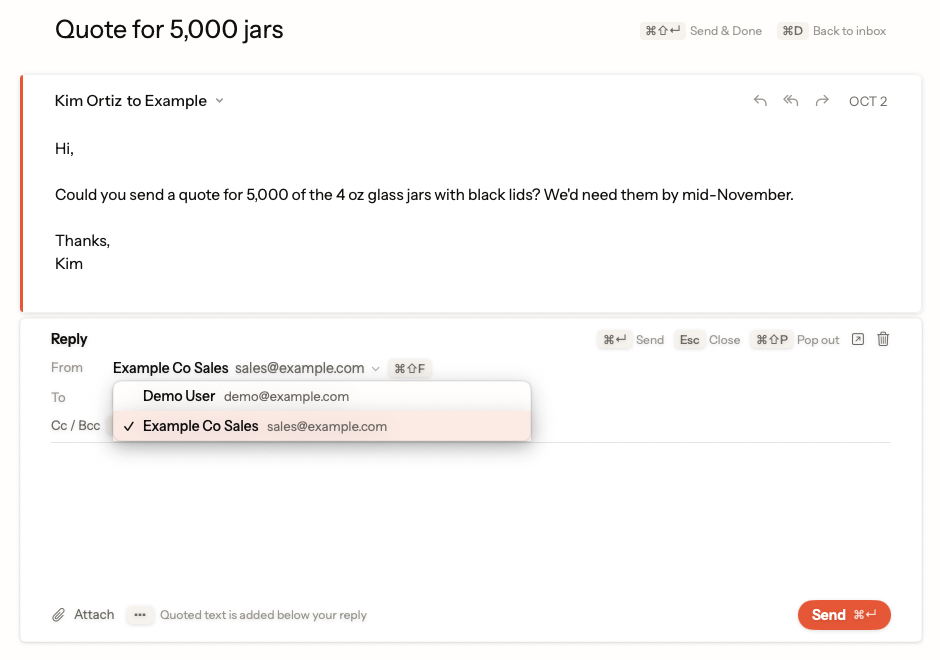
Each account keeps its own
Super Labels and colors are set for each account. Settings like Undo Send and the forgotten-attachment check apply to every account on the device.
To take an account out, open Settings, choose the account, then Remove Account. Supermail deletes that account's mail from the device. Nothing in Gmail changes.
Supermail is invite-only for now.
Request access